Build, test and maintain Delphix masking algorithms — on your own machine.
Work out which masking framework fits your data, try it against real values, build a ready-to-use configuration and push it straight to your engine — without creating a Rule Set or waiting on a masking job.
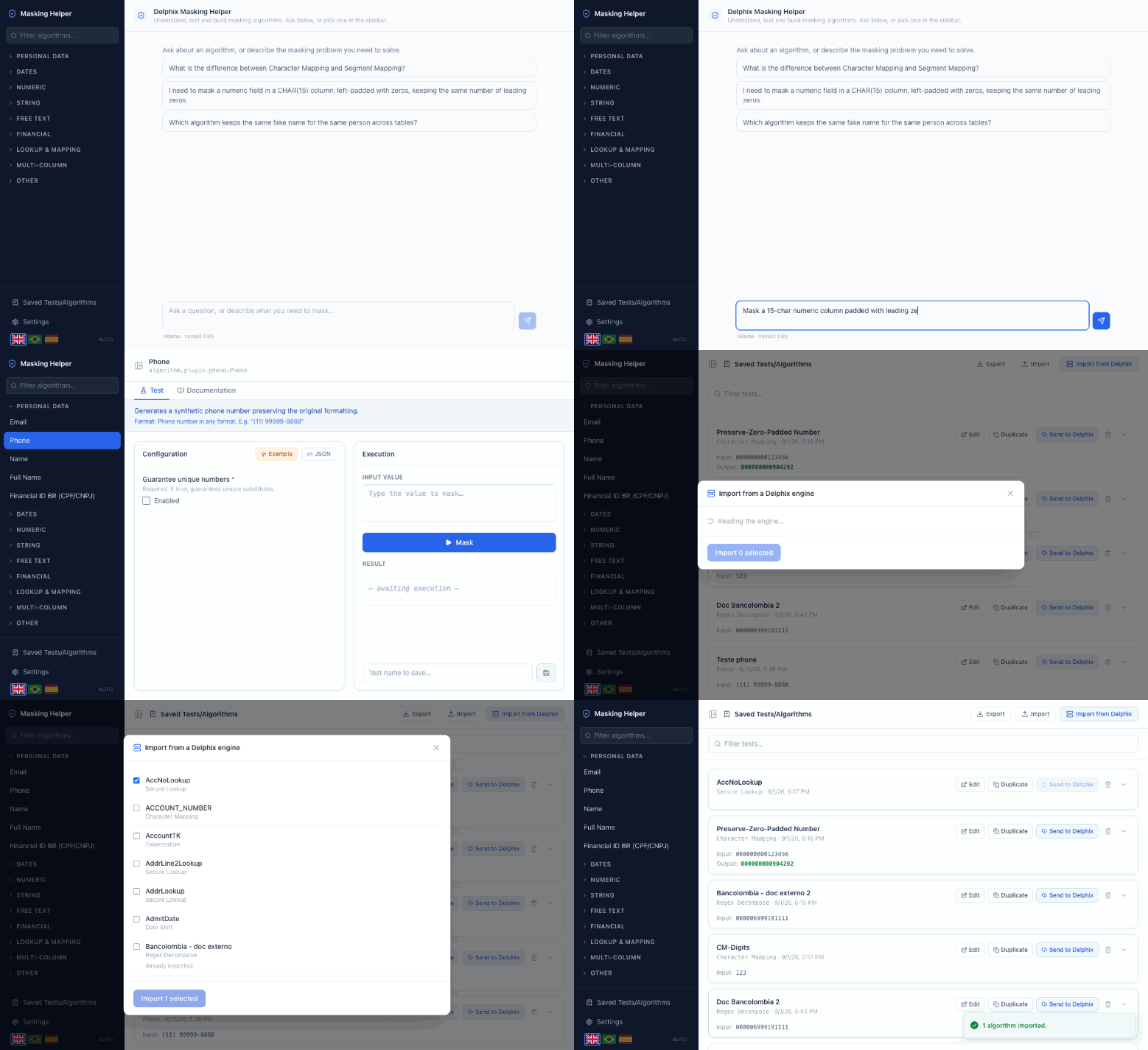
Three things, in order: asking the assistant for an algorithm and watching it build and validate one; running an algorithm against a real value; importing from a Delphix engine and sending one back. Every masked value is real output from the plugin.
An independent project — and what you need to use it
No affiliation with Delphix. This is an independent open source project. It is not built, endorsed, reviewed or supported by Delphix or its owners, and nothing here is an official product. Delphix and the product names used on this site are trademarks of their respective owners.
An active Delphix licence is required. The masking algorithms live in Delphix product libraries, which this project does not distribute and cannot replace. To run the tool you must already be entitled to those libraries and able to obtain the Masking Devkit (SDK) from Delphix — normally through an active licence and your account team.
Everything an algorithm needs, in one place
01
Understand
Each of the 31 masking frameworks explained in plain language: what it does, what it expects as input, and what every parameter changes. No more guessing from a parameter name.
02
Test
Run an algorithm against a real value and see the output immediately. Try a configuration, change one field, run it again — the loop takes seconds instead of a job run.
03
Build
Describe the problem in your own words and get back a configured algorithm, saved and ready to run. You do not need to know which framework to reach for.
04
Sync
Connect to a Masking Engine and pull its algorithms down to work on, or push yours up. An algorithm that came from the engine is updated there, not duplicated beside it.
Install it
One command. It asks where to put things, checks that Node, Java and git are on your machine — it never installs them, it only tells you what is missing — and leaves you a dlpx-helper command to start and stop the app.
Rather read it before running it? Download the same script, open it, then run it — the page for your system shows both ways.
Then one step only you can do
Copy the jars from your Masking Devkit (SDK) into the lib folder it created. The app opens on a screen listing exactly which files it needs and where they go.
Once installed: dlpx-helper starts it and opens the browser, dlpx-helper stop stops it, dlpx-helper update brings the latest version. Updating never touches your saved algorithms.
Point the tool at a Masking Engine and its algorithms are yours to work on: pull one down, change it, run it against real values until it does what you need, and send it back. The engine gets an update, not a second copy — the tool remembers where each algorithm came from. Anything you build from scratch goes up as a new algorithm.
Nothing is sent anywhere until you ask for it.
An assistant that checks its own work
Describe what you need to mask and the assistant picks the framework and configures it. Before anything is saved it actually runs the algorithm with that configuration — if it does not work, nothing is saved and you are told why. A configuration that looks plausible but fails never reaches you.
It runs against a local model by default, so nothing leaves your machine.
The algorithm reference
Every framework documented in full — behaviour, input format, worked input → output examples and every configuration parameter. Each example was produced by actually running the algorithm, never estimated.